
Microsoft Purview, from licensed to protected.
Luminara reads your Microsoft 365 tenant, fixes what stops Purview from working, designs the controls with you and runs them in simulation. Every finding has evidence behind it, and every change can be undone.
- Results in minutes
- Completely free
- No credit card
- Nothing to install
READS AND CONFIGURES ACROSS MICROSOFT 365
Results in minutes
From tenant ID to a readiness report, in minutes.
- Results in minutesThe readiness check is ready while you're still on the call.
- Completely freeEvery capability that's available today, for every tenant.
- No credit cardNothing to cancel and no trial clock.
- Nothing to installNo agent or script. One read-only approval in Microsoft.
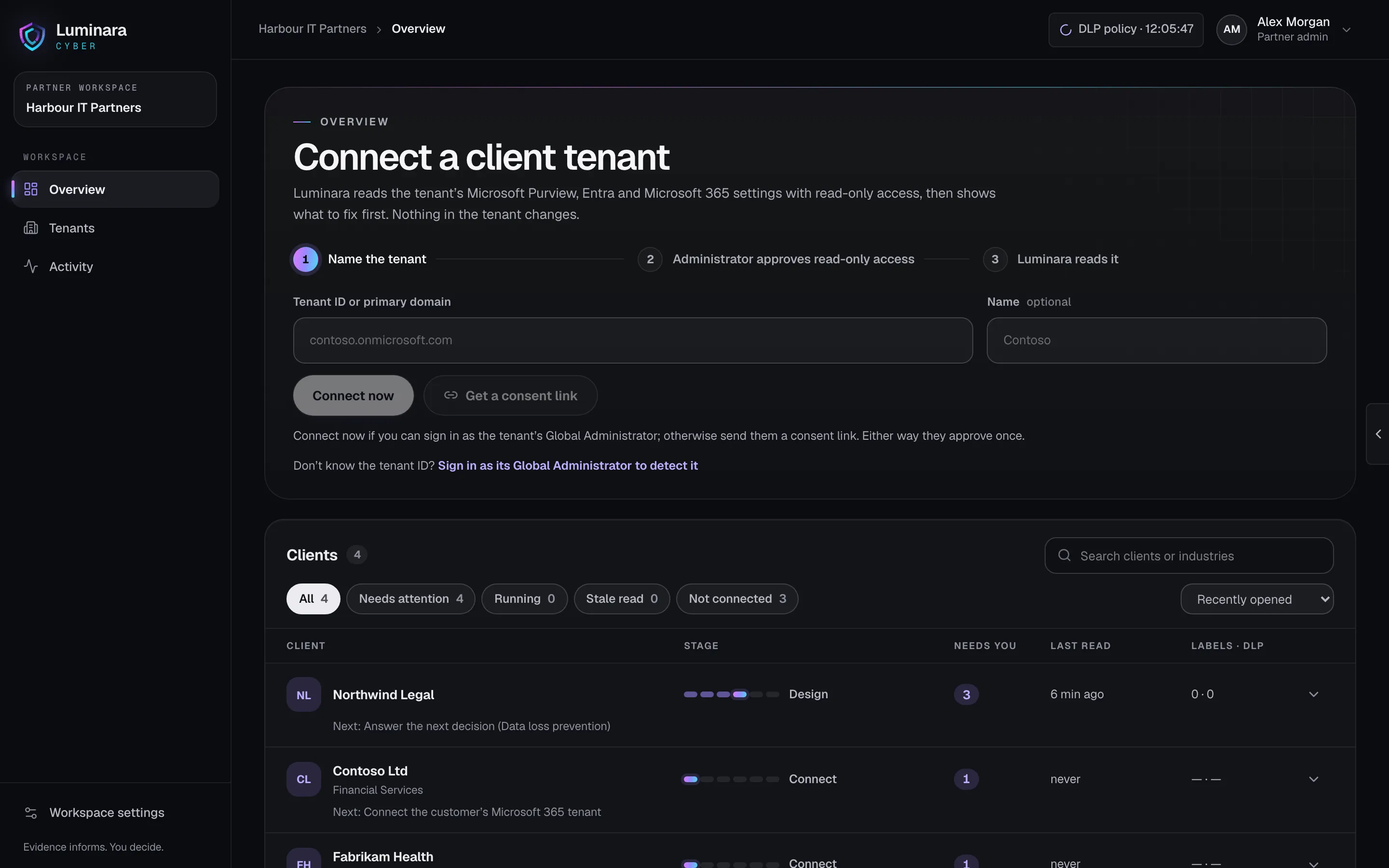
- 1Tenant
- 2Approve
- 3Read
- 4Report
Which tenant should Luminara read?
Approve read-only access
Read only- Read directory and licence data
- Read Purview, Exchange and SharePoint settings
- Read audit and DLP configuration
Reading northwindlegal.onmicrosoft.com
- Microsoft Entra ID
- Exchange Online
- SharePoint and OneDrive
- Microsoft Purview
- Defender and Intune
READINESS CHECK READY
23 capabilities placed
The gap
Most organisations already pay for Purview and get little from it.
SAME TENANT · SAME START DAY
The usual Purview project
Still in workshops
With Luminara
Tuned on real matches
The usual Purview project
MONTHS OF CONTRACTING AND WORKSHOPS
With Luminara
AUTOMATED FROM THE TENANT, DECIDED BY YOU
Getting started
Without Luminara: Statements of work, scoping calls and weeks before anyone looks at the tenant.
With Luminara: Connect read-only and have the readiness check in minutes.
Foundation
Without Luminara: Engineers click through a dozen admin portals to find what is switched off.
With Luminara: Every licensed capability checked, from licensed to in use, with one-click fixes that are read back and can be undone.
Customer context
Without Luminara: Workshops and questionnaires to learn what data matters, who owns it and where it goes.
With Luminara: Drafted from the tenant, your policies and public records, with every quote checked against its source.
DLP design
Without Luminara: The same design questions asked by hand in every engagement, then written up as a document.
With Luminara: Answered from evidence where possible, narrowed to a short list of decisions only people can make.
Rollout
Without Luminara: The design is re-keyed by hand and switched on, hoping nothing important gets blocked.
With Luminara: Deployed in simulation first and tuned on real matches before anyone is blocked.
Proof
Without Luminara: Screenshots pasted into a deck the night before the review.
With Luminara: Evidence behind every finding and change, and a branded report ready to download.
Built only for Purview
Luminara covers Purview from the foundation settings to working DLP policies. Sensitivity labels are next.
Designed from the business
Controls are based on the data the organisation holds and where it goes. A template doesn't know that a law firm sends court bundles to counsel.
It reads before it writes
The first connection is read-only. Policies run in simulation before they block anything, and each change keeps an undo.
The same method for every client
Any engineer can run the discovery, so your senior people only step in for the decisions.
Five steps
From first read to a working DLP policy.
- 01
01
Read the tenant
Connect with read-only consent. Luminara reads Purview and the platform it depends on, then checks every licensed capability, from licensed to in use.
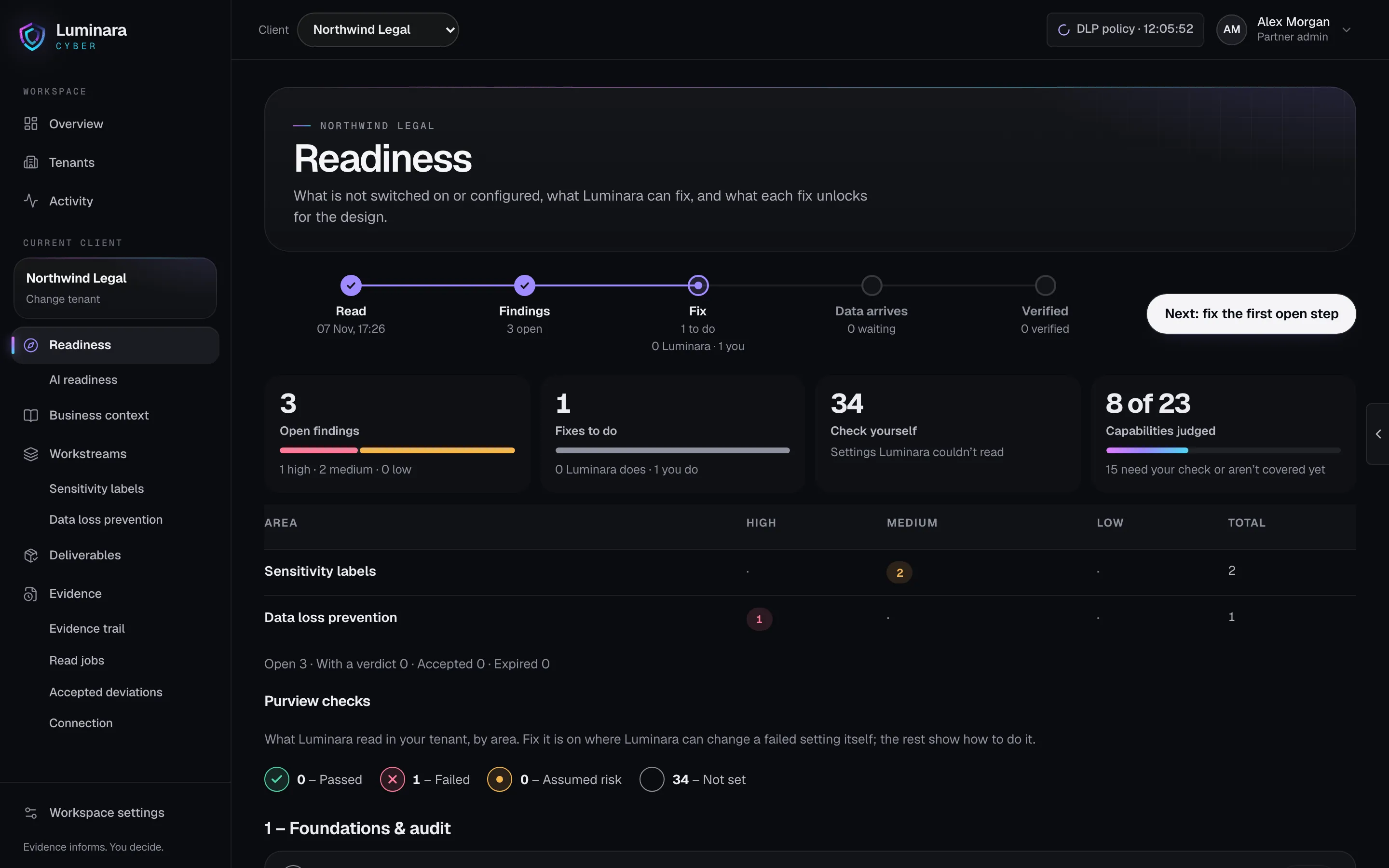
Explore the readiness checkNorthwind Legal / ReadinessPURVIEW READINESS
23 capabilities read
0 healthy0 to fixAuditSensitivity labelsData loss preventionRights ManagementInsider RiskDSPM for AIFix itNext: activate Azure Rights Management
Unlocks encrypted labels and DLP for protected mail
- 02
02
Fix the foundation
Switch on what the controls need, in dependency order. Each Fix it records the before value, makes the change, reads it back independently and keeps an undo.
Explore enablementNorthwind Legal / Readiness · Fix itFix itWritingVerifiedhighFoundations · Exchange OnlineUnified audit log ingestion is on
DLP alerts, Insider Risk and activity explorer all depend on it.
BEFORE
Off
CHANGE
AuditLog → On
READ BACK
pending
- 12:04:11 Confirmed by Alex Morgan, consultant
- 12:04:12 Change applied through the separate write app
- 12:04:19 Independent read-back: On
- 12:04:19 Undo recipe stored · Undo
- 03
03
Understand the business
Data classes, people, owners and flows, drafted from the tenant, your policies and public records. Every quote is checked against its source. Confirm it once.
Explore customer contextNorthwind Legal / Customer contextINFORMATION SECURITY POLICY · v4.2 · p.3
Client matter files are confidential and must not leave the firm except through approved channels. Staff handlingidentity documents such as passports must store them only in the matter workspace.Partners and associates are responsible for classification; exceptions are approved by the Head of Risk.Bundles may be shared with counsel via the secure portal.
DRAFTED · 5 ITEMS · QUOTES VERIFIED
Data classClient matter files1Data classUK passport numbers2PopulationPartners and associates3OwnerHead of Risk3FlowCourt bundles to counsel4Confirm once, and every workstream uses it - 04
04
AI drafts, a person approves
AI drafts the design and the Copilot controls from your policy, with citations. Rule-based checks then confirm the licences, scope and object IDs are valid. Nothing changes until a person approves it.
Explore AI and CopilotNorthwind Legal / AI readiness0%MICROSOFT 365 COPILOT
3 of 4 gates met
One step left before a wider rollout
- Sensitivity labels are published to Copilot users
- !Widely shared sites are reviewed or restricted
- A DLP policy covers prompts that contain sensitive data
- Highly confidential labels are excluded from Copilot
AI DRAFT · FROM YOUR POLICY · CITED
- 05
05
Simulate, then tune
Deploy the approved DLP design in simulation, read the matches back, and tune with evidence before anyone is blocked.
Explore DLP optimisationNorthwind Legal / Data loss prevention · Tune3 policies · 6 rulesDLP WORKSTREAM · STEP 5 OF 5
Running in simulation
- 1Off
- 2Simulation
- 3Simulation + tips
- 4Block with override
- 5Block
Payment card · Exchange0 matchesUK passport · OneDrive0 matchesClient files · SharePoint0 matchesProposed tuning · version 2
19 matches on Client files come from the shared templates library. Exclude it and raise the confidence level to high.
Review changeWhy?
For partners
Free Purview assessments, with your name on them.
- Your logo in the app and on every report
- Posture report, plus CIS Controls v8.1 and NIST CSF 2.0 evidence packs
- Every client in one workspace, each kept apart
- Free for every tenant you connect
MICROSOFT PURVIEW
Readiness report
Northwind Legal · 7 November 2026
CAPABILITY STATUS
TOP FINDINGS
- Rights Management is not activated
- No DLP policy covers Teams chat
- Labels are not applied to SharePoint files
FROM READ-ONLY EVIDENCE · EVERY FINDING CITED
Sensitivity labels and label publishing
Then every Purview solution after it. The goal is full rollout and optimisation support across Microsoft Purview.
It reads first. You decide what changes.
- Read permissions to start
- Nothing to install
- Every change can be undone
Security
Nothing changes without your approval.
Read-only by default
The first connection asks for read permissions only. Nothing in the tenant can change until a Global Administrator opts in.
Separate write access
Changes go through a second, optional app with only the roles each fix needs. Remove it and Luminara goes back to reading.
Every change can be undone
Before value, change, independent read-back and an undo recipe, recorded for every step Luminara takes.
AI never approves anything
AI drafts and explains. Only a person can approve a design or allow a change, and rule-based checks run first.
Every finding links to its source
Each recommendation links back to the setting or record Microsoft returned, and AI drafts are stored separately from those facts.
Every client kept apart
Every query is scoped to both the tenant and your workspace, so one workspace can never see another's clients.
Who it's for
For MSPs, MSSPs, consultants and in-house IT.
01
MSPs
Import clients from GDAP and run Purview for every one from one workspace, with the same evidence-backed method each time.
02
MSSPs
Sell data protection as a managed service. Check the foundation, run DLP in simulation and tune it from what it actually catches.
03
Consultants
Arrive at the first workshop with the tenant already read, the context drafted and the decisions narrowed.
04
Enterprise IT
Get Purview working in your own tenant without a six-month project, and keep proof of every change.
Is it really free?
Yes. Everything that is available today is free. Paid plans may follow later, and you will never be charged unless you choose one. No card is needed to start.
What permissions does Luminara need?
The first connection is read-only: a Global Administrator connects the tenant in one Microsoft sign-in, and Luminara gets read-only roles. That sign-in is used only for setup and is not kept. Write access is a separate, optional app that only gets the roles each fix needs, and you can remove it at any time.
Will it change anything in my tenant?
Not unless you ask it to. Every change is opt-in: you choose a single Fix it step, or approve a plan and let Luminara run it. Each change records the value before, reads the result back and keeps an undo.
Where is my data stored?
On Microsoft Azure, in a database with no public access. Evidence from each tenant is scoped to the workspace that connected it, and other workspaces cannot see it.
Does AI make decisions about my tenant?
No. AI drafts and explains, always with citations to the evidence or your policy. It never approves a design or authorises a change. Licensing, scope and ID checks are deterministic code, and a person approves every decision.
Do I need a licence to use Luminara?
No. Luminara needs no licence of its own and nothing to install. You need a Microsoft 365 tenant and a Global Administrator to connect it read-only, in one Microsoft sign-in.
Which Microsoft licences do I need?
Any Microsoft 365 tenant can run the readiness check. What Luminara designs depends on your licences. Microsoft 365 Business Premium, E3 or Office 365 E3 cover manual sensitivity labels, label publishing, retention and DLP for Exchange, SharePoint and OneDrive. Microsoft 365 E5, or E3 or Business Premium with the Microsoft Purview Suite add-on, adds auto-labelling, Endpoint and Teams DLP, Audit (Premium) and Content and Activity Explorer. Luminara checks the licences assigned to each user, not just the ones bought, and never recommends a capability the tenant isn't licensed for.
Can I use it under my own brand?
Yes. Add your logo and it replaces the Luminara mark in the app, and appears on the cover of the PDF and HTML reports you export, with your own cover title and colours. You can run the readiness check for a client or prospect at no cost and hand them a report on their Purview status under your name.
Do I need to be an MSP?
No. Luminara is built for MSPs, MSSPs and consultants who run Purview for clients, and for IT teams who run it in their own tenant. Partners can import their GDAP customers from Partner Center; each one is read only after its administrator approves.
Check your Purview in three minutes.
Connect read-only and see what's switched on, what's missing and what to fix first. It's free.
READ-ONLY BY DEFAULT · EVERY CHANGE REVERSIBLE · NO CARD NEEDED